
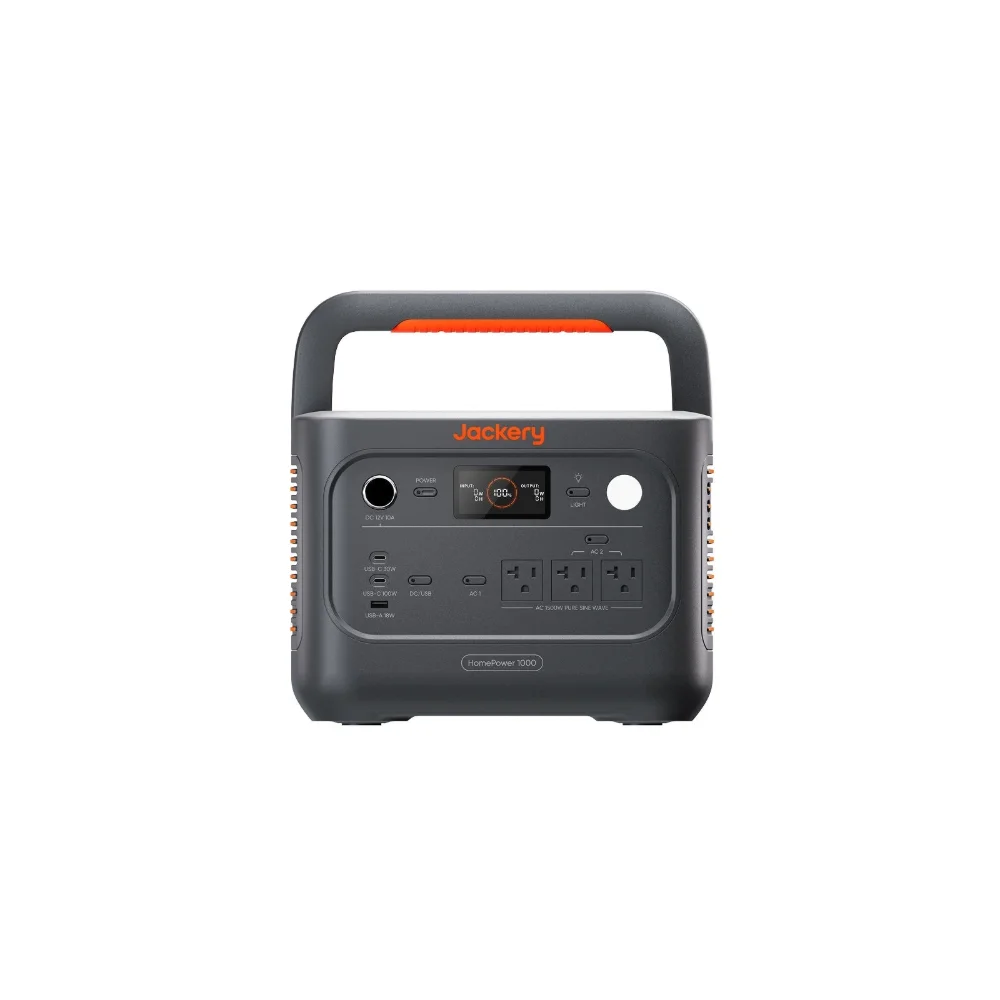

Jackery just brought the HomePower 1000 v2 to market, and the headline spec is a 50-minute full charge. That’s a genuinely fast number for a 1024Wh unit, and it’s worth digging into what that actually means in practice rather than just repeating the marketing line. I pulled the specs directly from Jackery’s product page and cross-checked the charging claim against multiple independent write-ups before writing this.
Affiliate disclosure: This article may include affiliate links — if you buy through them we may earn a small commission at no extra cost to you, but our recommendations are based on our own independent research.
How We Evaluated This Review
This review is based on Jackery’s published specifications and product documentation for the HomePower 1000 v2, cross-checked against independent outlet write-ups and third-party retail listings that corroborate the charging claim. We have not physically tested this specific unit ourselves. Where we’re offering a judgment rather than a stated spec — how it compares to the Explorer 1000 v2, who should actually buy it — we flag that distinction rather than presenting it as verified lab data. Our full editorial approach is outlined on our About page.
Specs at a Glance
| Capacity | 1024Wh (20Ah at 51.2V), LiFePO4 |
| Continuous output | 1,500W |
| Surge output | 3,000W |
| AC charge time | 0-100% in ~50 minutes (Emergency Charging mode) |
| Cycle life | Rated for 6,000 cycles to 70%+ capacity |
| Weight | ~23.4 lbs |
| Switchover time | Sub-10ms UPS-style switchover |
What the HomePower 1000 v2 Actually Is
The HomePower 1000 v2 is Jackery’s compact home-backup-focused power station: 1024Wh of LiFePO4 capacity (20Ah at 51.2V), rated for 6,000 charge cycles to 70%+ capacity, with 1,500W continuous AC output and a 3,000W surge peak. It weighs about 23.4 lbs, which is light enough to move between rooms without much trouble, and it’s rated for 3kV of built-in surge protection.
The standout feature Jackery is leading with is UPS-style backup: a sub-10-millisecond switchover when the power cuts out, meaning sensitive electronics like a PC or a modem shouldn’t even blink during a grid interruption. That’s a meaningfully faster switchover than older units in this category, which sometimes take longer and can cause a brief reboot on connected devices.
The 50-Minute Fast Charge, Explained
The 0-100% charge in 50 minutes happens through what Jackery calls Emergency Charging mode in its companion app, running through the AC adapter. That’s a real, verifiable spec — it shows up consistently in Jackery’s own marketing, independent outlet write-ups, and third-party retail listings, not just a one-off claim. For comparison, a lot of similarly-sized power stations from a few years ago took 1.5 to 2+ hours for a full charge, so this is a legitimate generational jump for AC charging.
One caveat worth flagging: fast-charge modes like this typically run the battery harder than a standard trickle charge. Jackery doesn’t publish a cycle-life penalty for using Emergency Charging repeatedly, so if you want to preserve long-term battery health, it’s reasonable to reserve the 50-minute mode for when you genuinely need it — an incoming storm, for example — rather than using it as your everyday charging method.
Real-World Runtime: What 1024Wh Actually Covers
Using standard LiFePO4 efficiency assumptions (85-90% delivered after inverter losses), here’s roughly what the HomePower 1000 v2 gets you on a full charge:
| Appliance / Load | Typical draw | Approx. runtime |
| Refrigerator (cycling compressor) | ~150W average | ~5.5-6.5 hours |
| Wi-Fi router + modem | ~20W combined | ~40+ hours |
| Desktop PC + monitor | ~250W | ~3.5-4 hours |
| CPAP machine | ~40W average | ~2-3 nights |
| A few LED lights + phone charging | ~30W combined | ~25+ hours |
That spread is consistent with its positioning: this isn’t sized to run a fridge for a multi-day outage on its own, but it comfortably covers the always-on essentials — networking gear, a desktop, medical devices, lighting — that benefit most from the sub-10ms UPS switchover.
Who This Is Actually Built For
Based on the spec sheet, this isn’t trying to be a whole-house backup solution — 1,500W will run a fridge, some lighting, a modem/router, and a few small appliances, but not central AC or an electric range. It’s positioned for apartment dwellers, renters, and homeowners who want fast, plug-and-play backup for essentials without the installation and expense of a larger home battery system.
How Does It Compare to the Explorer 1000 v2?
Jackery’s own comparison chart shows the Explorer 1000 v2 as the more general-purpose, portable-first sibling — slightly higher capacity (1,070Wh) but a longer AC charge time (about 1.58 hours) and no dedicated UPS branding. The HomePower 1000 v2 trades a little bit of capacity for a much faster charge and the sub-10ms switchover, which makes sense given its home-backup positioning.
How It Compares to Other Reviews on This Site
Against the Dabbsson DBS1000 Pro, the HomePower 1000 v2 trades Dabbsson’s higher continuous wattage (2,000W vs 1,500W) for a faster, more UPS-focused charging profile — the two units are aimed at slightly different priorities within the same rough capacity class. Against larger whole-home systems like the Bluetti AC500 or EcoFlow DELTA Pro Ultra, the HomePower 1000 v2 is in an entirely different category — a fraction of the cost and capacity, built for always-on essentials rather than whole-circuit backup.
Strengths and Weaknesses, Beyond the Spec Sheet
Pros: Genuinely fast 50-minute full charge, sub-10ms UPS-style switchover protects sensitive electronics, light enough to reposition easily, 6,000-cycle rated battery.
Cons: 1,500W continuous output limits it to essentials rather than major appliances, no published cycle-life data specific to repeated fast-charge use, not expandable with add-on batteries the way some competitors are.
The UPS positioning is the most distinctive thing about this unit, and it is a genuine differentiator rather than marketing dressing — a sub-10ms switchover is a real, measurable spec that matters concretely for anyone running always-on equipment like a home office setup, a security system, or medical devices that shouldn’t experience even a momentary interruption. Where it’s less convincing is as a general-purpose power station: the 1,500W ceiling and lack of expansion batteries mean it doesn’t scale the way a Bluetti or EcoFlow modular system does if your backup needs grow.
Warranty coverage follows Jackery\u2019s standard terms across its lineup, backed by an established support network — a meaningful factor for a device positioned specifically as emergency-readiness gear, where you want confidence the company will still be there to honor a claim years down the line.
My Take
I don’t think the 50-minute charge is just a marketing gimmick — it’s a genuinely useful feature if you’re the type of household that wants backup ready to go on short notice, like ahead of a forecasted storm, rather than something that’s been slowly topping off for hours. It’s not a whole-home solution, and it’s not trying to be. If you want fast, no-installation UPS-style backup for your essentials, this is a currently-available, verified option worth a look. Check current price on Jackery →
FAQ
How much can the Jackery HomePower 1000 v2 power?
With 1,500W continuous output and 1024Wh of capacity, it can run essentials like a fridge, router, lights, and small electronics, but it’s not sized for whole-house backup or high-draw appliances like central air.
Is the 50-minute charge time real?
Based on Jackery’s own specs and multiple independent write-ups, yes — it’s achieved through the AC adapter using the app’s Emergency Charging mode, not a theoretical lab number.
Is it worth buying over the older HomePower or Explorer 1000 models?
If fast recovery time and UPS-style switchover matter to you, the v2’s charge speed and sub-10ms switchover are real upgrades. If you just need general portable capacity and don’t need the fastest possible recharge, an Explorer-series unit may serve you just as well for less.
Does the sub-10ms switchover actually prevent a computer from rebooting?
For most desktop PCs and networking gear, a switchover under 10 milliseconds is fast enough that the device’s internal power supply capacitors bridge the gap without a visible interruption — though results can vary slightly by hardware, so treat it as a strong likelihood rather than an absolute guarantee across every device.
Can it be charged by solar panels?
Yes, though the 50-minute headline figure is specific to AC wall charging via Emergency Charging mode — solar recharge time depends on your panel wattage and will take considerably longer, as with any power station.